Getting Started
Requirements
- Windows 10 or later
- Yu-Gi-Oh! Master Duel installed through Steam
- The in-game data download completed for the player profile you want to mod
Python is only required when running the project from source.
Install and launch
For the packaged application:
- Download the latest Windows executable from the project's GitHub Releases.
- Put it in a folder where you want the app's database, exports, bundle copies, and backups to remain.
- Close Master Duel.
- Run the executable.
Windows may show a SmartScreen warning for an unsigned build. Confirm that you downloaded the file from the project's release page before choosing to run it.
Select your game data
On a new installation, only Configuration is available until a valid game path is saved.
The easiest option is Auto-detect. It searches your Steam libraries and lets you choose among the detected player profiles.
For manual selection, choose the player-ID folder under:
<Steam library>\steamapps\common\Yu-Gi-Oh! Master Duel\LocalData\<player ID>
Select the folder whose contents begin with directories such as 0000; do not select LocalData, masterduel_Data, or data.unity3d itself. The placeholder profile folder 00000000 is not a usable player profile.
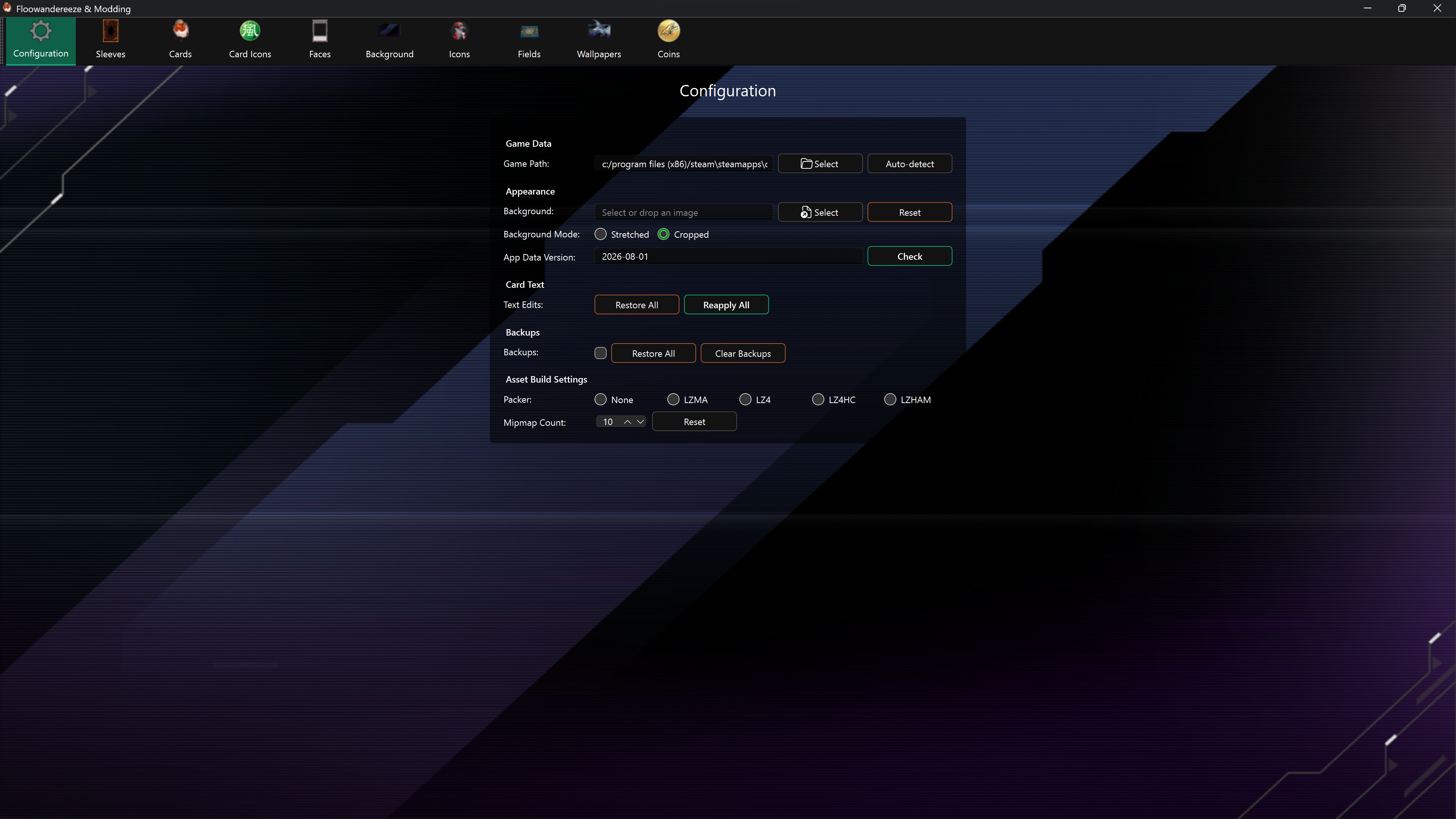
After saving the path, the app starts its first data update if no local data version exists. Wait for all update tasks to finish, then restart the application to load the editor pages.
Enable backups before editing
Backups are disabled by default. On Configuration, enable Backups before your first replacement. The first replacement of an asset then saves its current texture under backups\<asset type>.
A backup only protects the texture captured when it was created. Clearing backups is permanent, and enabling backups after an asset was already changed cannot recreate the original texture.
Make a first replacement
- Open an editor from the top toolbar.
- Select an asset from Results.
- Choose a PNG or JPEG with Select, or drag an image onto the page.
- Compare Current and Preview.
- Choose Replace and wait for the success notification.
- Start Master Duel and check the asset in the game.
PNG is recommended, especially when transparency matters. The app resizes images as required by each asset, but using the same aspect ratio as the current texture avoids stretching or empty space.
Where files are saved
Folders are created beside the application (or in the current working directory when running from source):
| Folder | Contents |
|---|---|
images\<asset type> |
PNG textures created with Extract |
bundles\<asset type> |
Original game bundles created with Copy |
backups\<asset type> |
Automatic texture backups used by Restore |
The Background editor exports its texture directly under images, while most other editors use a type-specific subfolder.