Player Icon Editor
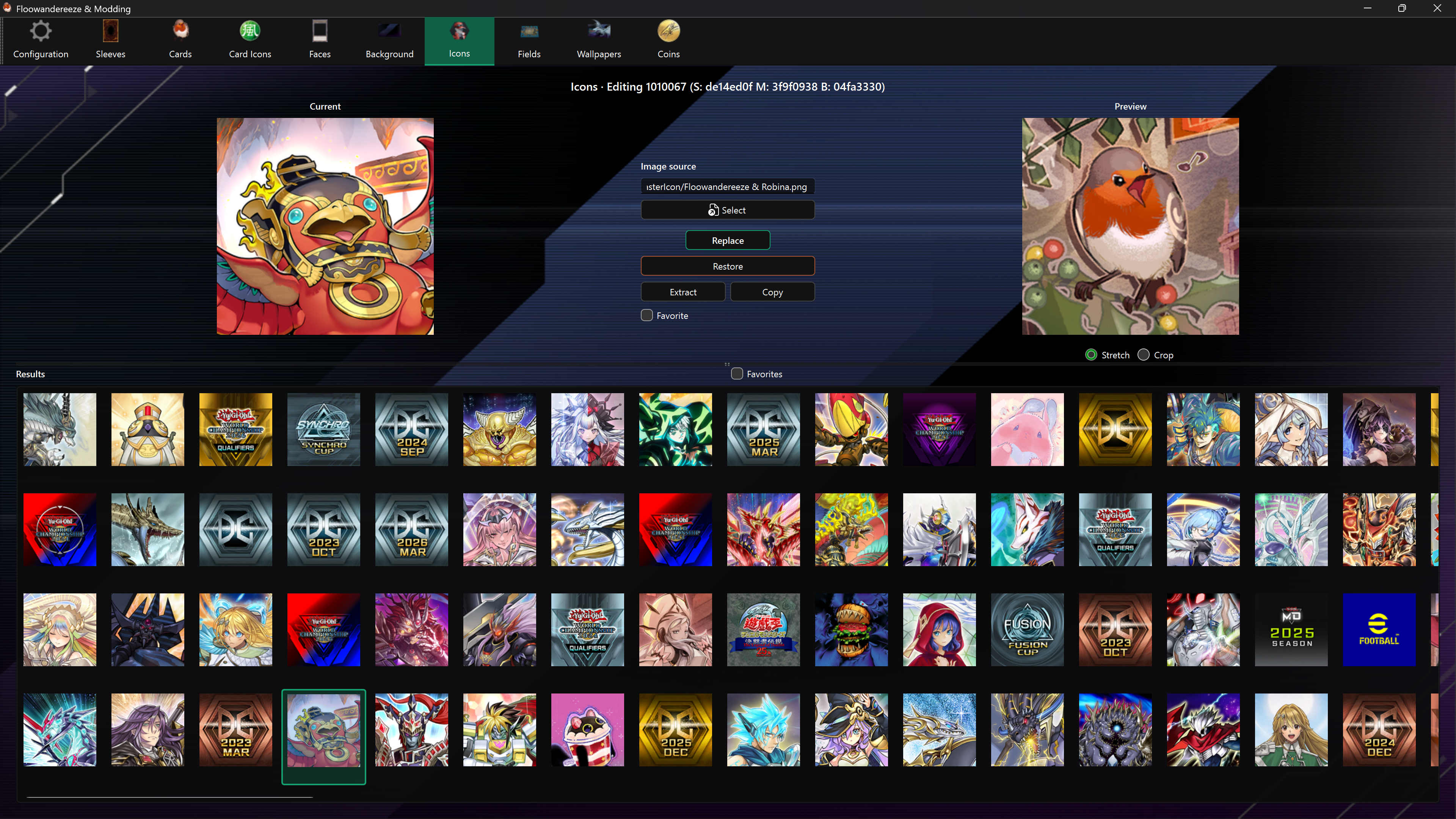
The Player Icon Editor replaces profile icons and manages the small, medium, and large bundles as one asset.
Find an asset
Results show asset names. Hover over a shortened label to see its full name. The selected asset's name also appears above the editor. Assets without a translated name retain their code.
Type at least three characters in the search bar, then press Enter, click Search, or choose a completion suggestion. Search matches part of the name without case sensitivity. Clear the search bar to show all results again.
Favorites shows all favorites independently of the search; turning it off restores the last executed search.
After updating the app, use Check in Configuration to download the new names, then restart the app. Favorites and backups are preserved.
Replace an icon
- Select an icon from Results.
- Choose a square PNG or JPEG with Select, or drag it onto the page.
- Check Preview and choose Replace.
The app resizes the source and writes all three icon resolutions. Use a square image to avoid distortion; PNG is recommended when transparency matters. Current displays the medium version.
Other actions
- Favorite marks the selected icon; Favorites filters the result grid.
- Extract saves all three textures under
images\icons. - Copy saves all three Unity bundles under
bundles\icons. - Restore uses the backup of the largest version to rebuild all three sizes.
Enable backups before the first replacement. Only the largest original texture is stored as the automatic backup.